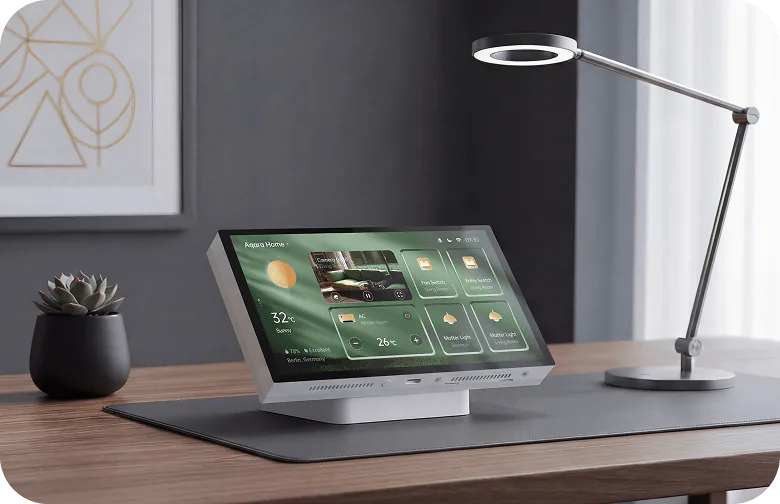
A useful household screen with a luxury price
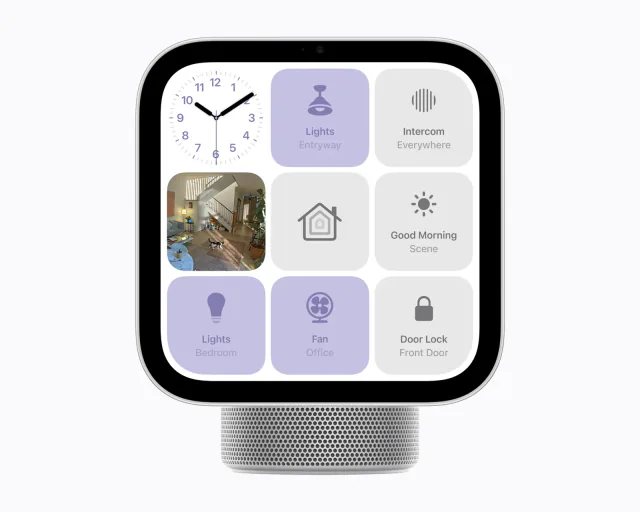
Panel Hub S1 Plus Desktop makes the strongest case in a home where one person's phone has become everybody else's remote control. A permanent screen on the kitchen counter or a side table can give the household access to lights, curtains and scenes without finding that phone or learning several apps.
The exact MP-K05D desktop model was €299.99 at bol Netherlands on September 10, 2026, with delivery included. At that price, it needs to become something people use regularly. A screen bought to trigger one bedtime scene is an expensive substitute for a simple button.
This version uses USB-C power and a tabletop base, so it avoids replacing a mains wall switch. That makes it easier to place and move. Allow space on the surface for the panel and its cable, with a suitable power source nearby.
The dashboard should make the home easier to use
The 6.9-inch, 1440 × 720 display supports up to ten dashboards with as many as 60 cards on each. Card sizes, names and icons help put familiar controls where people expect them, while proximity activation wakes the screen as someone approaches.
The useful design exercise is choosing what to leave out. A few large controls for the room and a clearly named evening scene are more approachable than a miniature copy of every device in the app. Extra dashboards make sense for occasional controls without crowding the first screen.
Aqara Home remains part of maintaining the layout. Device names and icons are edited in the app, and supported card types determine what can appear. Buy the panel if someone in the household is willing to set up a sensible shared interface once and maintain it as devices change.
The doorbell view is appealing, within Aqara's limits
A compatible Aqara doorbell can bring its live view onto the panel when somebody rings. Supported door controls can then make it useful at a desk or in a kitchen where reaching for a phone interrupts another task.
Aqara's current product notes restrict streaming to Aqara cameras and one feed at a time. Switching between cameras is possible; a simultaneous wall of surveillance feeds is a different requirement. A home built around another camera brand should assign no value to an unverified promise of future support.
Siri also needs a HomePod or HomePod mini configured as the Apple home hub. The panel adds another place to speak to Siri, rather than removing that existing requirement. It is most attractive when those supporting devices are already in the home.
It adds a screen, but does not replace every hub
The built-in Zigbee hub can bridge supported Aqara accessories outward through Matter. Bringing third-party Matter devices into Aqara Home for display goes the other direction and requires a separate Aqara Matter controller. The panel itself also lacks Thread networking.
An existing M200 or M3 owner is therefore in a better position to add this display than someone expecting €299.99 to buy the entire system. Infrared air-conditioner control likewise needs a suitable separate IR device.
Keep a phone or tablet arrangement that the household already likes. Choose S1 Desktop when a permanent, shared Aqara screen solves a daily annoyance—especially around doorway viewing and room controls. For a new smart home, establish the working devices and routines first, then decide whether they deserve this much screen hardware.
Keep reading
In the news
Spot a mistake or missing context?
Send a quick note so it can be checked against the source material.