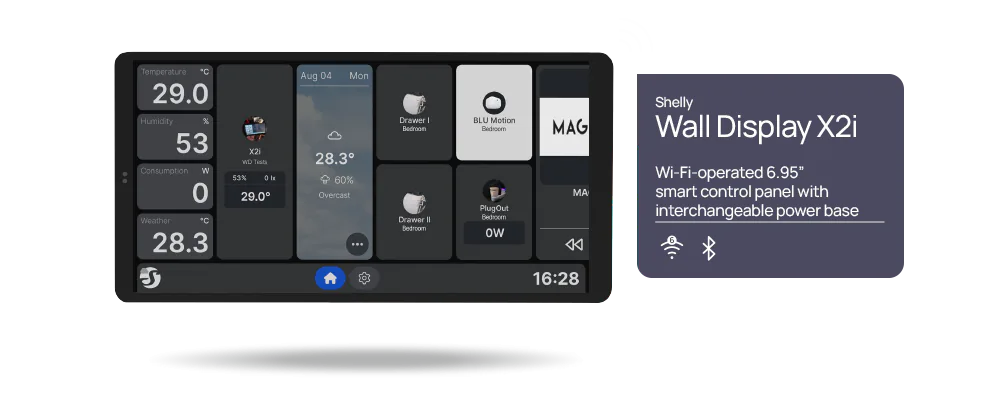
Shelly moved Wall Display firmware 2.8.0 from beta to its stable channel on October 6, 2026, and the official changelog now lists 2.8.4, published October 19, as the current stable release. The update gives newer panels two separate Matter roles. As a controller, the Wall Display adds Matter lights, plugs, sensors, covers, fans and thermostats from other brands and runs them from its own screen. As an accessory, it can be added to Apple Home, Google Home, Alexa, SmartThings or Home Assistant, which then control its relay, dimmer and thermostat and can use the sensor that wakes its screen as an occupancy sensor in automations. On the radar-equipped XL, occupancy clears a short time after the room empties; on the other models it clears as soon as you step away from the panel.
Updated October 25, 2026: this article first covered Shelly's September 3 announcement. Since then, the firmware has reached the stable channel, Shelly's changelog has limited the Matter roles to a different set of models than the announcement named, and the Premium app features promised for September have not arrived. Version 2.8.4 fixes three security flaws and is the release to install on every panel.
Five panels get both roles
Shelly's changelog limits both roles to what it calls modern displays: the Wall Display XL, X2i, X1i, U1 and D1. The September announcement listed a different set: it named S1, S2 and XT models and left out the D1. The changelog is the later and more specific source, so treat its five models as the current list until Shelly explains the difference.
| Wall Display hardware | Matter role with firmware 2.8 |
|---|---|
| XL, X2i, X1i, U1 and D1 | Matter controller and Matter accessory |
| First-generation Wall Display and Wall Display X2 | Can control Matter devices shared from a newer panel, but cannot commission devices or join another ecosystem as Matter accessories |
The older panels therefore need a newer Wall Display in the home before they can show any Matter device. Sharing uses a one-time code, and either display can end it at any time.
As a controller, the panel adds a device from its 11-digit Matter setup code and can pass Wi-Fi credentials to a new device over Bluetooth. Shelly says those devices can then take part in the panel's local scenes, automations and scripts without a subscription. A device added on the Wall Display can join other systems too: in the panel's Matter settings, "Use this device in other systems" shows a pairing code, valid for three minutes, that Google Home, Apple Home, SmartThings or the maker's app can use to control it alongside the panel.
X2i, X1i and D1 show a certification warning
The accessory role works on all five modern panels, but Shelly's Matter guide says certification is still under way for the X2i, X1i and D1. Apple Home, Google Home, Alexa and SmartThings each warn that those panels are not certified Matter devices when you add them. Shelly tells owners to continue anyway and says a future update will carry the certification without re-pairing. That update had not arrived by 2.8.4 on October 19. The XL and U1 already carry a declaration from the Connectivity Standards Alliance and add without the warning.
Two setup details are easy to miss. The panel fetches its own Matter credentials from Shelly once, which needs an internet connection and a restart before the display will offer itself to another system. It is also discovered over the local network only, never Bluetooth, so the ecosystem's hub must be on the same network and subnet as the display.
Premium app control has not arrived
Shelly's announcement said Shelly Premium subscribers would get remote control of Matter devices in the Shelly app, history and cloud scenes later in September. Shelly's changelog has marked that feature "PREMIUM ONLY, TBA" since the 2.8.0 beta notes of September 23, and the tag was still there after the October 19 update for 2.8.4. Shelly has not given a new date. For now, Matter devices on a Wall Display are controlled from its screen, from other Wall Displays it shares them with, through local scripts and the local API, and from any other Matter system you add them to with "Use this device in other systems". If remote control from the Shelly app is the reason to buy a panel, wait for that release.
The panel still is not a Thread border router
Matter-over-Thread accessories still need a Thread border router from another system. The Wall Display commissions over Wi-Fi and Bluetooth and has no Thread network to offer, so it can add a Thread device only after another hub has put it on a Thread network. A Thread device already running under another system's border router, such as IKEA's DIRIGERA, can still join: turn on that system's option for sharing the device with other controllers, then add it on the panel with the pairing code it provides. The panel then reaches that device through the other hub's border router, so that hub has to stay powered and on the network. A device that supports both Thread and Wi-Fi joins over Wi-Fi.
Install 2.8.4 on every panel
The 2.8.4 release, published October 19, fixes three security flaws that an independent researcher reported to Shelly under coordinated disclosure. Restoring a specially crafted settings backup could give an attacker control of the display, restoring a backup could change settings that are not part of it, and the display did not verify that it was connecting to genuine Shelly servers. The release also fixes a local web interface bug that let a web page opened on another device on the same network read data from the display. Shelly's security advisories page still lists no advisories, so the severity of these flaws and the earlier versions they affect are not public. Update every panel, and until a panel is on 2.8.4, restore only backup files you made yourself. The changelog does not say whether 2.8.4 reaches the first-generation Wall Display and Wall Display X2, which Shelly's security statement describes as being in deprecation, so owners of those two panels should check that the update appears.
The same release improves Matter thermostat and air-conditioner tiles. They can now switch between heating, cooling and automatic mode when the device supports more than one, and the target temperature moves in whole degrees. Before 2.8.4, those tiles could already set the target temperature and switch an air conditioner on or off. A thermostat tile switches on and off only after you turn on "Allow turning thermostats on or off" in Settings, General.
A panel still on 2.8.2 or earlier also lacks the October 12 2.8.3 fixes: every device behind a large Matter bridge, such as a Philips Hue Bridge, showed as offline, and Matter tiles showed a channel's type, such as "Thermostat", in place of the device's name. Those older releases can also miss a new software version until the display restarts, so restart a panel that still offers no update. A panel already on 2.8.3 keeps a dot on the Shelly logo while an update is waiting. Shelly has posted four follow-up releases since 2.8.0 went stable, on October 6, 8, 12 and 19. After updating, test the Matter path on a noncritical light or plug, checking both local control and what the other ecosystem exposes, before relying on it for heating, covers or other consequential automations.
- Editor
- JC Martinez
AI tools may help draft or organize pages. Matterhome checks product claims against cited sources before publication.
Spot a mistake or missing context?
Send a quick note so it can be checked against the source material.