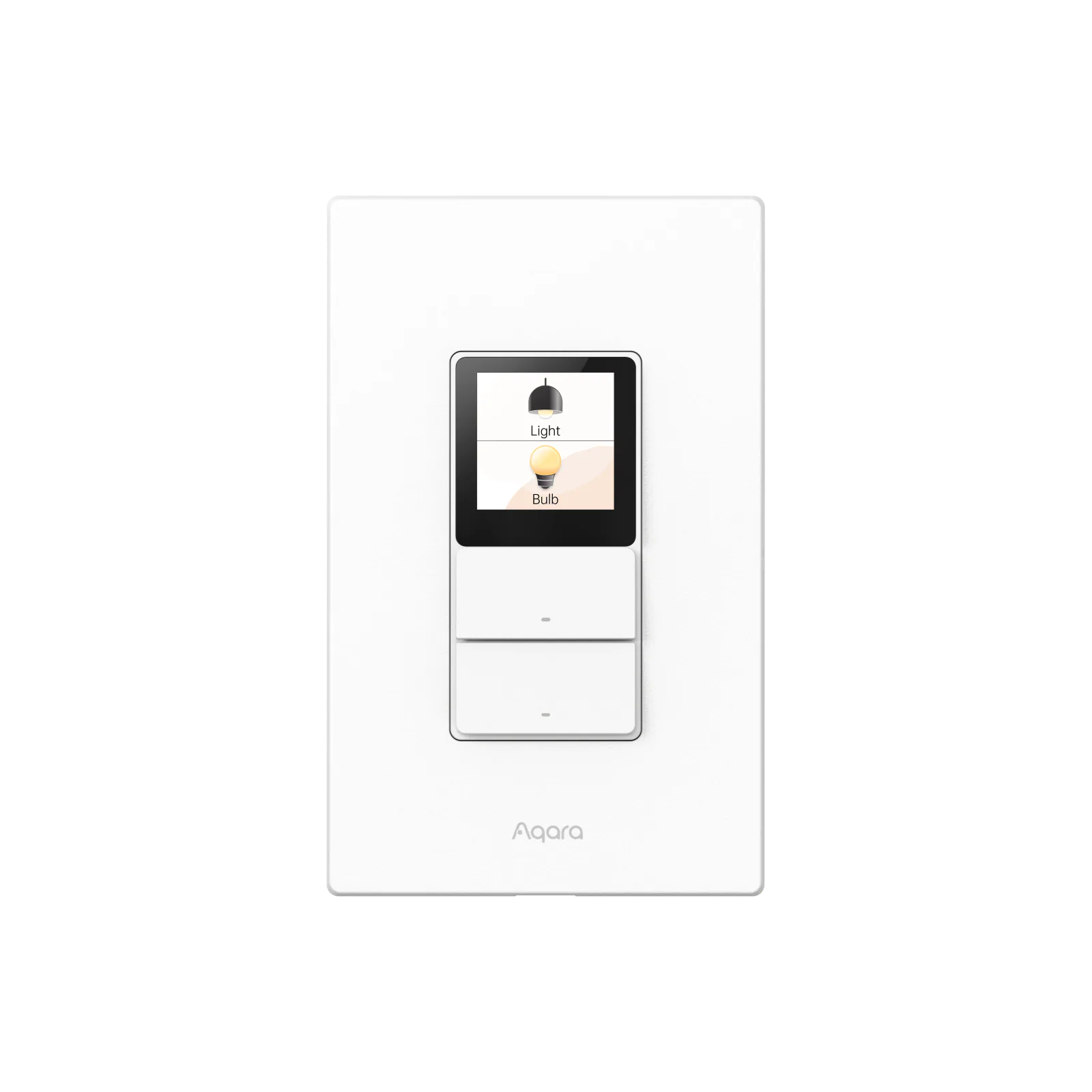
A good idea when the room needs more than two switches
Touchscreen Switch S100 puts a small scene controller where people already reach to turn on the lights. Two physical buttons handle the wired circuits, while the 1.3-inch touchscreen can bring room scenes and compatible device controls into the same wall position.
That combination is its appeal. In a living room with ceiling lights, lamps and a movie scene, it can offer more useful choices than a row of ordinary switches. In a room with one light and nothing else to control, the screen is mostly extra hardware.
Aqara's US store listed it at $79.99 on September 10, 2026. Standard shipping adds $9.99 for a standalone order in the contiguous US and DC, making $89.98 before tax. Electrical installation and any missing Aqara hub are additional costs, so the sticker price is not the whole project.
The wired side is two on/off circuits, not a dimmer
This US model is WS-K06E. It requires a neutral wire, and its two relay outputs switch wired lights on and off. Adjusting a smart bulb from a screen does not make those relays capable of dimming a conventional light fitting.
Aqara lists 100–240 V input and maximum loads of 10 A for incandescent lighting or 400 W for LED/CFL. Those published figures should not be doubled simply because there are two channels. Have the installer confirm the intended loads, wiring and available box space against the exact unit; Aqara requires professional installation.
That check comes before choosing a screen theme. If the room needs ordinary wired dimming, buy a suitable dimmer. If replacing the existing switch creates substantial wiring work, the convenience of a small display needs to justify that expense.
The physical buttons are the sensible part
Standard Mode keeps each physical button focused on its wired light. Dual Mode also lets the press trigger an automation. Wireless Mode leaves the wired output at a fixed state while the button triggers an automation instead, which can be useful when connected smart lighting needs to stay powered.
There are six virtual wireless buttons plus two more triggers associated with the physical buttons. That gives up to eight scene triggers, not eight separately wired light circuits. The physical pair can also appear on the screen when configured through Aqara Home.
For a shared room, predictable light control matters more than using every trigger. Keep the ordinary action obvious and use the screen for the few scenes people will remember. A clever remapping that surprises everyone else is a poor trade.
Aqara Home is where the screen earns its premium
Native Matter over Wi-Fi allows basic use in other supported ecosystems without an Aqara hub. Full layout, theme and linked-device customization depends on Aqara Home; Aqara's manual also requires an Aqara Matter hub for that integration.
The manual describes a fixed screen layout outside Aqara Home and currently lists no wireless-button exposure in Google Home. That makes S100 a much weaker screen purchase for a Google-only household. Energy monitoring is similarly platform-dependent, so do not assume every app offers Aqara's consumption history.
Its built-in Thread border router is supported only in Aqara Home and SmartThings. It is a useful extra in those systems, but does not turn this wall switch into a universal replacement for other platforms' hubs. The original S100 reviewed here is also separate from the Presence Touchscreen Switch S100; do not buy it expecting that other model's presence-sensing feature.
Choose S100 for an existing Aqara room where the wired controls and scene shortcuts will both be used. Keep a working plain switch when the proposed upgrade mainly adds a screen to a job that was already simple.
Keep reading
In the news
Spot a mistake or missing context?
Send a quick note so it can be checked against the source material.